Knowledge: How to make a choice values visibility dependent on another choice field selection
 Back
Back
Knowledge
Title*How to make a choice values visibility dependent on another choice field selection
ManualAdministration
Manual Level TwoData Rooms
Manual Level ThreeForms Design
Created07/10/2024
DetailPlease note choice visible choice values do not work under the following conditions:
- Client Side Visibility Mode
- Advanced Visibility
This article relates to when you have several choice field values in choice field, but you only want some of them to display if a value in another choice field has been set.
These steps describe how to set this up:
- Open the field that has the values where you need to control visibility. From this point forward we will refer to this as the child field.
- Go to Choice Visibility and set "Show when choice following" to the parent choice field that will control visiblity.
- If the child field is to appear for any choice the parent field is set to, then tick all the options.
- Go to the child field Choice Settings and add any choices you need if not already there.
- Click edit on the choice you need to control visibility of. You should then set all the choices from the parent field, selection the options you require.
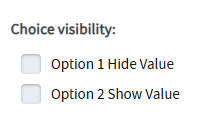
- Save the option.
- Change any other options you require, then save the field and save the form.
Additional Manual Locations