Knowledge: Data Room Item Security
 Back
Back
Knowledge
Title*Data Room Item Security
ManualAdministration
Manual Level TwoData Rooms
Manual Level Three
Created17/07/2019
DetailData Room Modes
A data room can be used by multiple sites but the items are set in one of the following three modes:
- Secured to current site only (default).
- Published items as read only to all sites with exception of master site.
- Master site can view all items created by sites.
Publishing items to all sites as read only
To share an item with other sites as read only you need to do the following:
- Set Data Room feature setting: Items : Publish items to all Clients as readonly.
- Make sure sites requiring access to items have data room added.
- You must have a master site set which would usually be your primary site. Note it should never be set as a client site in a client portal. There should also only be one master site per Sysero instance. Master site is set in Admin > Sites.
- The items that require sharing must be created in the master site.
Allowing master site to view all items created by sites
To allow the master site to view and manager all items create by sites you need to do the following:
- You must have a master site set which would usually be your primary site. Note it should never be set as a client site in a client portal. There should also only be one master site per Sysero instance. Master site is set in Admin > Sites.
- Set Data Room feature setting : Items : Allow master Clients to access items across all Clients.
- To make it easy to identify which site created item you can add a refiner that uses the site ID to lookup site name.
Item Level Security
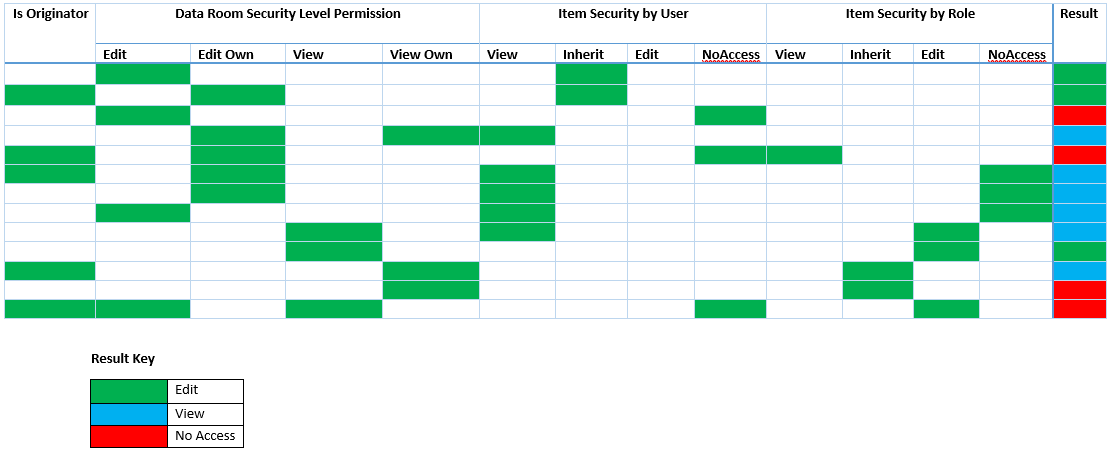
Security is applied by the following:
- Data Room security level permissions.
- Item Security set per item on Roles and Users.
To view an item a user needs a minimum of:
- Data Room: View Contents
- Data Room: View Contents (Own Only)
To edit an item a user needs a minimum of:
- Data Room: Edit
- Data Room: Edit (Own Only)
Note:
- Data Room: Security Override will override individual item security. Should only be set for admins who need to troubleshoot and fix permissions that were set incorrectly.
- Own only in both above means items they created and are stored as originator.
- In addition, we also have Data Room: Allow View Summary. Once scenario where this might not be checked is if you want them to see search results and download document, but not access the full profile.
The above data room permissions are overridden by the Item Access Levels
- Inherit From Role : Defaults to the Data Room security level permissions.
- View Only : Even if user had Data Room: View Contents (Own Only) and this is not an item they have created, they can now view it.
- Edit and View : Even if user had Data Room: Edit (Own Only) and this is not an item they have created, they can now edit and view it.
- View Only / Request Access Workflow : This mode is for when you do not want someone to download the document but access the profile. You can then combine this with a workflow to enable them to download document after approval.
- No Access : Regardless of Data Room security level they are blocked from accessing item. With exception of having permission Data Room: Security Override
Note the following when settings security:
- If not users or roles are set on an item then default security is it is open to all based Data Room security level permissions and the Data Room mode.
- Once a role or user is assigned then all other users get the default level set for the item which can be set to one of the Item Access Levels.
- If you have security access specified by your User it will take priority over level set by your Role.
Example combinations:
Additional Manual Locations