Knowledge: How do I add menu links to the Sysero task pane in Version 2 of Outlook Office Addin
 Back
Back
Knowledge
Title*How do I add menu links to the Sysero task pane in Version 2 of Outlook Office Addin
ManualOffice Addin Tips
Manual Level TwoVersion 2
Created30/09/2024
DetailTo make the links icon appear on the Sysero task pane you need to have at least one link.

To add links go to Admin > Site > Menu Pages.
You can either add a new menu page like you usually would or simply enable it for Sysero for Office.
The relevant settings for Office are:
- Visible in Sysero Office Sysero Tab : This is what enables the menu item for Office.
- Use Internal Browser in Sysero Office : This determins whether it opens within the Office environment or externally in a normal web browser. Generally most Sysero internal pages should have this checked, any external pages should not have it checked.
- Open in new window? : If the above it checked then default it to open in task pane, otherwise open in new internal office dialog.
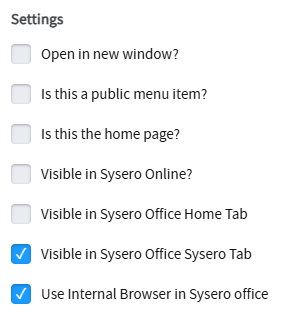
Visible in Sysero Office Home Tab will add to the Home Task Pane.
Additional Manual Locations